How to Enable Custom Permalinks on a Local WordPress Server
There is a problem that when our users work with WordPress installations on a local server, they cannot get the permalink rewrite rules to work. Even though they tried to enable custom permalinks, they still got a 404 error.
To get rid of this problem, you need to enable the rewrite module in your WAMP, XAMPP or MAMP installation. Start by finding the WAMP icon in the taskbar and go to Apache » Apache modules. This brings up a long list of modules that you can enable or disable. Find the “rewrite_module” module and tick it.
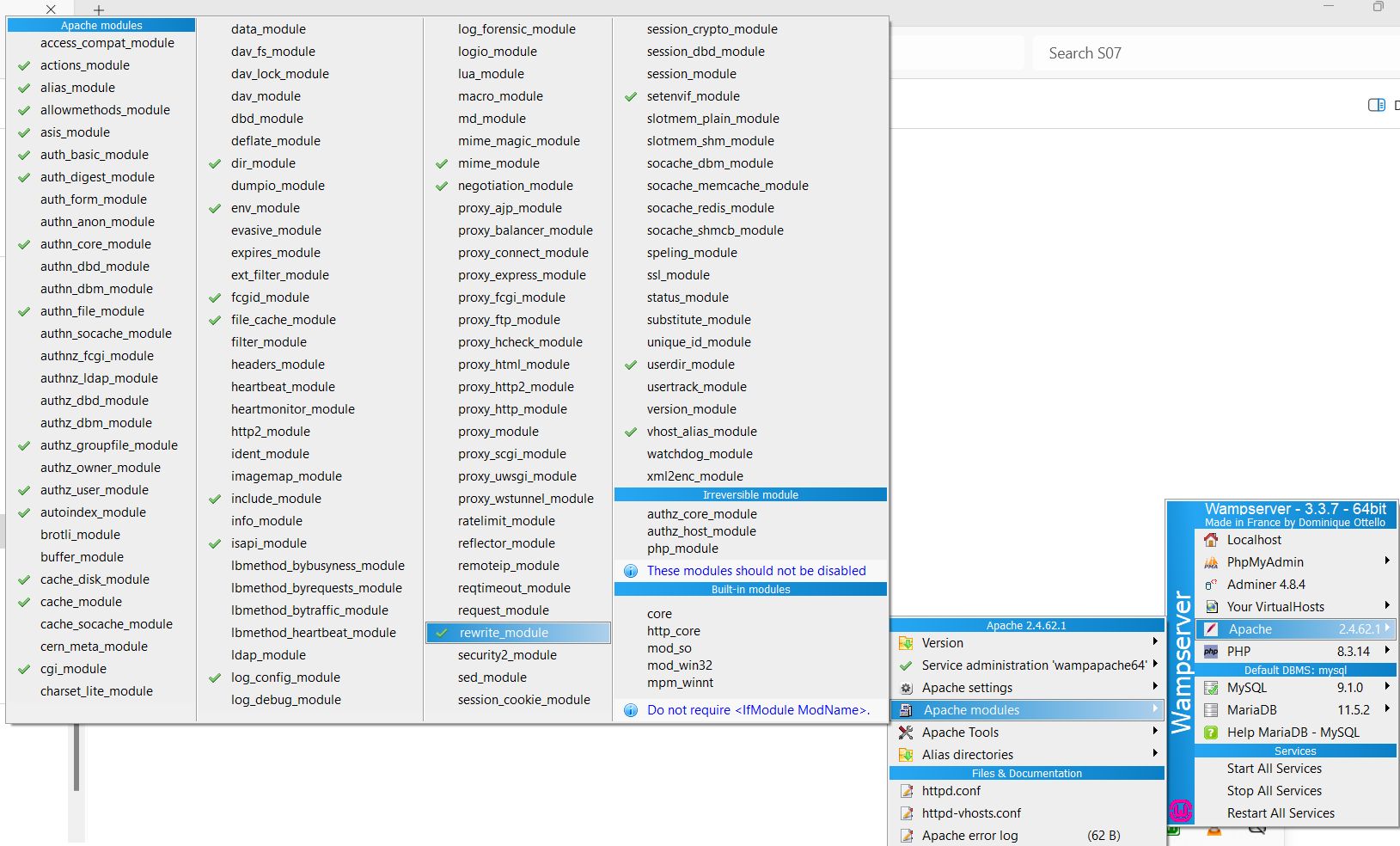
After that, your custom permalink structure should work immediately.
Alternatively, you can edit the local server’s configuration directly. Go to the Apache folder, then to the “conf” configuration folder. Find the httpd.conf file. Find this line in it:
#LoadModule rewrite_module modules/mod_rewrite.so
Just remove the hash sign at the beginning, so that it looks like this:
LoadModule rewrite_module modules/mod_rewrite.so
Our specialization is WordPress website development and maintenance. Contact us for a free consultation — [email protected], +371 29394520
