
How to Change the Address Bar Color in a Mobile Browser
You have probably noticed that many popular sites such as the BBC and Facebook use their brand colors for the address bar in mobile browsers. In this article we will show you how you can achieve a similar effect.
Why Make the Address Bar Color Match Your Site in a Mobile Browser?
Many WordPress themes support mobile devices. However, it still looks like just a website. Changing the address bar color creates the feeling that the person is using an app. All of this leads to a more pleasant user experience, sales and conversions.
Today this feature is supported in most modern Chromium-based mobile browsers, including Google Chrome, Edge, Brave, Opera and Samsung Internet. Browsers also support specifying different colors for light and dark mode, which lets the address bar automatically adapt to the user’s preferences.
How to Do It
Just add the following code to the header.php file of your child theme right before the closing </head> tag.
<meta name=”theme-color” content=”#ff6600″ />
This line is an HTML meta tag that a mobile browser uses to change the color of the address bar.
If you want to support light and dark mode, you can add two lines:
<meta name=”theme-color” media=”(prefers-color-scheme: light)” content=”#ffffff”>
<meta name=”theme-color” media=”(prefers-color-scheme: dark)” content=”#000000″>
The content field holds the hex code of the color you want to use as the background. Not sure how to get this code? You can get it using any graphics editor such as Adobe Photoshop, Gimp, Paint and others.
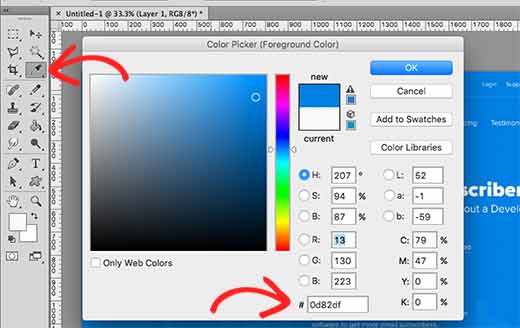
You can also pick a color using online HTML color picker services or browser extensions such as ColorZilla to quickly get the hex code you need from any web page.
*This method does not work in iOS Safari, but if you are building a PWA (a progressive web app, that is, a website that behaves like an app on the device), you can change the status bar color with <meta name=”apple-mobile-web-app-status-bar-style”>
Our specialization is WordPress website development and maintenance. Contact us for a free consultation — [email protected], +371 29394520
