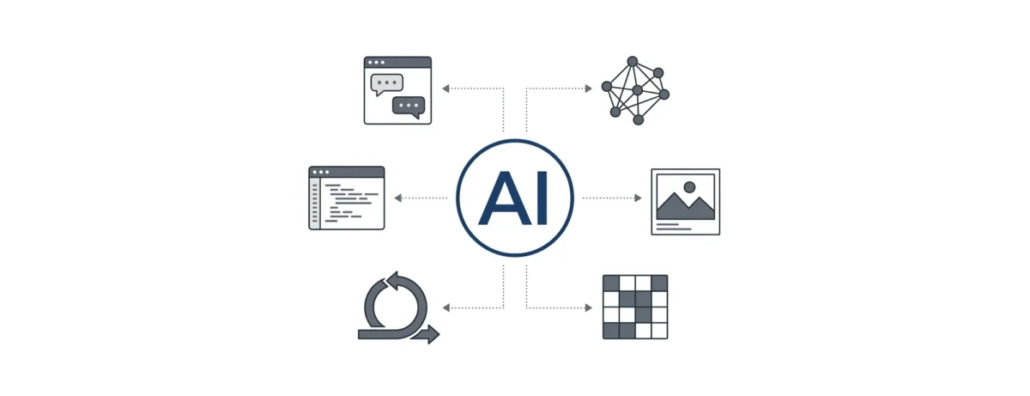
AI Basics & Terminology: Understanding the Core Concepts
AI is everywhere in web development today, from generating code to creating content and visuals. Behind these capabilities are a set of core ideas that shape how AI tools behave and respond. In this guide, we’ll break down the key concepts and terminology.
Natural Language Processing (NLP)
One of the most important concepts is Natural Language Processing, or NLP for short. This is the technology that allows AI to understand human language — whether you’re typing a question, describing a feature, or asking it to generate content.
Instead of relying on strict commands, NLP lets AI interpret meaning, context, and intent. That’s why you can type something like “Create a responsive pricing table with three tiers” and get working code or a layout. The AI isn’t just spitting out pre-written snippets — it’s translating your instructions into actionable results. This ability to “read” and “understand” human language is central to the AI-powered tools we use in web development today.
NLP also underlies tools that summarize documentation, explain complex code, or even rewrite text in different styles. Whenever you interact with an AI in natural language — asking it questions or giving it instructions — you are experiencing NLP in action.
Prompt
A prompt is simply the instruction or request you give to an AI tool. It can be as short as a sentence or as detailed as a paragraph describing exactly what you want.
The quality and specificity of the prompt often determine how well the AI performs. For example, the difference between saying “Generate a form” and “Generate a responsive login form with email and password fields, a ‘Remember Me’ checkbox, and a submit button that validates input” can be huge. AI uses the prompt to understand both what you want and how you want it structured.
Prompt Engineering
While a prompt is simply what you ask the AI, prompt engineering is the practice of shaping those instructions to get better results.
At first, it might seem like AI either “works” or doesn’t, but in reality, small changes in phrasing can lead to very different outputs. Adding detail, structure, or constraints often improves accuracy. For example, instead of asking for “a landing page,” you might specify layout sections, tone, or even technologies to use.
Over time, people learn how to guide AI more effectively — breaking down tasks, giving clearer instructions, or refining outputs step by step. This turns interacting with AI into a skill of its own, where the quality of results depends not just on the tool, but on how you communicate with it.
Generative AI
Generative AI refers to systems that can create new content rather than just analyzing or summarizing existing material. This includes generating text, code, images, and even music.
In web development, generative AI powers tools that can write articles, produce custom visuals, or scaffold entire projects. Unlike traditional software, which follows predefined rules, generative AI produces outputs based on learned patterns, making it flexible and adaptive to your instructions.
AI Image Generation
AI isn’t limited to text and code — image generation is transforming visual content creation as well. By providing a simple prompt, developers and designers can generate illustrations, icons, diagrams, or UI mockups.
This capability makes it easy to produce visuals that match a website’s tone and style, helping maintain consistency across pages without manually creating every element. It’s a natural extension of content generation, complementing text and code with visuals created on demand.
Multimodal AI
Multimodal AI refers to systems that can work with multiple types of input and output — not just text, but also images, code, audio, or even video.
In web development, this means you can move between different formats seamlessly. You might describe a design in text, generate a visual mockup, and then turn that into working code — all within the same system.
This blending of formats is one of the reasons AI tools feel so flexible. Instead of switching between separate tools for writing, designing, and coding, multimodal AI allows those tasks to happen in a connected way.
Large AI Models
At the heart of modern AI are large AI models, trained on massive datasets of code, text, and design examples. These models can generate content, explain logic, or even predict what a user might need next.
For example, a model can suggest the next lines of code in a project or propose alternative phrasing for a paragraph in a blog post. Because they’ve learned from so much data, these models don’t just repeat patterns — they adapt to context and generate outputs tailored to the current task. This is what allows AI to respond to nuanced instructions and handle complex workflows in web development.
Training Data
All AI models rely on training data — the examples they learn from. For code-focused AI, this might include public repositories, tutorials, and documentation. For text or image AI, it includes books, articles, and visual media.
The model learns patterns, styles, and rules from this data. When you provide a prompt, it draws on these learned patterns to generate output that aligns with what it has seen before — but in new combinations tailored to your request.
Machine Learning
Machine learning is the method by which AI systems learn from patterns in data. Over time, the system improves its performance by recognizing trends, corrections, and preferences.
For instance, a coding assistant might notice that developers often adjust certain types of suggestions and begin offering improved recommendations automatically. Similarly, an AI tool generating images or layouts can refine its outputs based on past interactions to better match a user’s style or expectations. Machine learning is what allows AI to become smarter and more context-aware as it is used.
Few-Shot Learning
Few-shot learning refers to an AI’s ability to learn from just a small number of examples provided in a prompt.
Instead of training a model from scratch, you can show it a few examples of what you want, and it will follow the same pattern. For instance, you might provide two or three examples of how to format a piece of content or structure code, and the AI will continue in that style.
This makes AI much more adaptable, especially when working on tasks that require a specific format or approach.
Fine-Tuning
Fine-tuning is the process of taking a general AI model and adapting it for a specific task or domain.
For example, a company might fine-tune a model using its own documentation, design guidelines, or codebase. This helps the AI produce outputs that are more aligned with that particular project or organization.
Instead of a one-size-fits-all system, fine-tuning allows AI to become more specialized — matching tone, style, or technical requirements more closely.
Embeddings
Embeddings are a way for AI to represent information — like words, sentences, or pieces of code — as numerical values that capture their meaning and relationships.
While this happens behind the scenes, it plays a big role in how AI understands context. For example, it allows the system to recognize that “login form” and “sign-in page” are closely related, even though the wording is different.
Embeddings are also used in features like search, recommendations, and code navigation, helping AI connect related ideas and retrieve relevant information quickly.
Context Awareness
Context awareness is an AI’s ability to understand the surrounding information when generating outputs. In coding, it might suggest lines that fit your existing project structure. In content generation, it ensures text or images align with previous sections or components.
This allows AI to create results that feel coherent and integrated rather than generic or out of place, improving usability and overall workflow efficiency.
IDE (Integrated Development Environment)
An IDE, or Integrated Development Environment, is the workspace where developers write, test, and debug code. Think of it as the central hub where all aspects of building a website or application come together. Modern IDEs provide syntax highlighting, error detection, and other utilities to help developers work more efficiently.
In recent years, AI has been integrated directly into IDEs, which means the assistant is right where the work happens. For example, as you write a function, the AI can suggest improvements, detect potential bugs, or even generate entire sections of code based on your description.
This integration transforms the IDE from a simple coding tool into a collaborative workspace, where the developer and AI can work together. It also means you don’t have to switch to a separate application or website — everything happens in the same environment, making the workflow smoother and more intuitive.
API (Application Programming Interface)
An API is a way for different software systems to communicate with each other. In the context of AI, APIs allow developers to integrate AI capabilities directly into websites or applications.
For example, instead of using an AI tool manually, a developer might connect an application to an AI service through an API. This allows features like content generation, chat interfaces, or image creation to be built directly into a product.
APIs are what make AI scalable — enabling it to move beyond standalone tools and become part of larger systems and workflows.
Autonomous Agents
Autonomous agents are AI systems that can perform multi-step tasks or make decisions independently. For example, an agent might generate code, test it, and document the results without constant human input.
These agents can coordinate multiple tools and workflows, handling repetitive or procedural tasks automatically. They are increasingly being used in web development to speed up processes that used to require manual intervention at every step.
Refinement / Iterative Feedback
Most AI tools rely on iterative feedback. You provide a prompt, review the results, and then adjust your instructions or parameters to refine the output.
This back-and-forth approach allows the AI to align more closely with your vision without starting from scratch each time. It’s particularly useful in web development, where requirements may change or designs may need continuous improvement.
Latency
Latency refers to the time it takes for an AI system to respond after receiving a request.
In web development, this can affect user experience. For example, if an AI-powered feature — like a chatbot or content generator — takes too long to respond, it can feel slow or unresponsive.
Optimizing latency is important when integrating AI into live applications, especially those that rely on real-time interaction.
Once these concepts start to feel familiar, the way modern AI tools behave becomes much easier to understand. What might seem like “magic” at first is really a combination of these ideas working together — interpreting language, learning from data, and responding to context.
With this foundation in place, it becomes much easier to explore how AI is actually applied across web development — from writing code to generating content and shaping user experiences. At Coma, we’ve integrated these tools into our web development services to deliver faster, smarter results for our clients.
Our specialization is WordPress website development and maintenance. Contact us for a free consultation — [email protected], +371 29394520
Leave a Reply
Want to join the discussion?Feel free to contribute!