
How to Add Categories to Custom Post Types in WordPress
By default, categories are used only for posts. However, in some scenarios you may want to use them with a custom post type. In this article we will show you how you can do it.
The Plugin Method
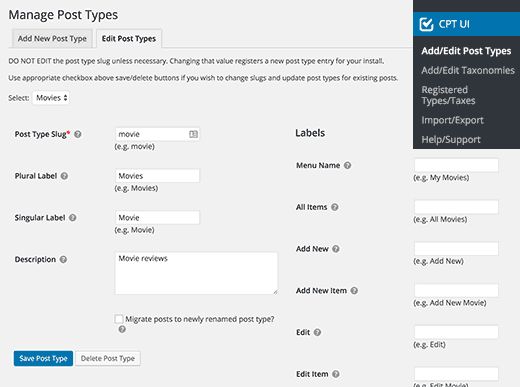
For beginners we recommend using the Custom Post Type UI plugin to create a custom post type. With this plugin you can associate a custom post type with any built-in or custom taxonomy, including categories. After installing the plugin, go to CPT UI » Add/Edit Post Types to create a new custom post type or edit an existing one.
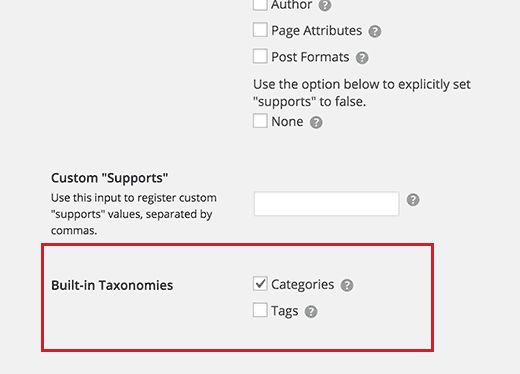
Scroll down to Advanced Options and you will see the Built in Taxonomies parameter. Tick the box next to Categories and save your post type.
Adding Categories to a Custom Post Type Manually
If you created a custom post type by adding code to the functions.php file, you need to add categories as a supported taxonomy using the register_taxonomy_for_object_type() function.
All you need to do is add this line after registering your custom post type:
register_taxonomy_for_object_type( ‘category’, ‘movies’ );
If you already have another custom taxonomy, for example topics, add both like this:
register_taxonomy_for_object_type( ‘topics’, ‘movies’ );
register_taxonomy_for_object_type( ‘category’, ‘movies’ );
Here is an example of the complete code, where we created a custom post type called “movies” with support for all the built-in categories.
function custom_post_type() {

    // Set UI labels for Custom Post Type
    $labels = array(
        'name'                => _x( 'Movies', 'Post Type General Name', 'mytheme' ),
        'singular_name'       => _x( 'Movie', 'Post Type Singular Name', 'mytheme' ),
        'menu_name'           => __( 'Movies', 'mytheme' ),
        'parent_item_colon'   => __( 'Parent Movie', 'mytheme' ),
        'all_items'           => __( 'All Movies', 'mytheme' ),
        'view_item'           => __( 'View Movie', 'mytheme' ),
        'add_new_item'        => __( 'Add New Movie', 'mytheme' ),
        'add_new'             => __( 'Add New', 'mytheme' ),
        'edit_item'           => __( 'Edit Movie', 'mytheme' ),
        'update_item'         => __( 'Update Movie', 'mytheme' ),
        'search_items'        => __( 'Search Movie', 'mytheme' ),
        'not_found'           => __( 'Not Found', 'mytheme' ),
        'not_found_in_trash'  => __( 'Not found in Trash', 'mytheme' ),
    );

    // Set other options for Custom Post Type
    $args = array(
        'label'               => __( 'movies', 'mytheme' ),
        'description'         => __( 'Movie news and reviews', 'mytheme' ),
        'labels'              => $labels,
        'supports'            => array( 'title', 'editor', 'excerpt', 'author', 'thumbnail', 'comments', 'revisions', 'custom-fields' ),
        'hierarchical'        => false,
        'public'              => true,
        'show_ui'             => true,
        'show_in_menu'        => true,
        'show_in_nav_menus'   => true,
        'show_in_admin_bar'   => true,
        'menu_position'       => 5,
        'can_export'          => true,
        'has_archive'         => true,
        'exclude_from_search' => false,
        'publicly_queryable'  => true,
        'capability_type'     => 'page',
        'show_in_rest'        => true,
    );

    // Registering your Custom Post Type
    register_post_type( 'movies', $args );

    // Registering Categories and tags
    register_taxonomy_for_object_type( 'category', 'movies' );
    register_taxonomy_for_object_type( 'post_tag', 'movies' );
}

/* Hook into the 'init' action */
add_action( 'init', 'custom_post_type', 0 );
Displaying Several Post Types on a Category Page
By default, category pages on a WordPress site display the standard post type. If you want your post type to be displayed on the same category page as the default posts, you need to add the following code to the functions.php file:
add_filter( 'pre_get_posts', 'query_post_type' );
function query_post_type( $query ) {
    if ( $query->is_main_query() && !is_admin() && is_category() ) {
        $post_type = get_query_var( 'post_type' );
        if ( $post_type ) {
            $post_type = $post_type;
        } else {
            $post_type = array( 'post', 'movies' );
        }
        $query->set( 'post_type', $post_type );
    }
    return $query;
}
Do not forget to change movies to the name of your custom post type.
Our specialization is WordPress website development and maintenance. Contact us for a free consultation — [email protected], +371 29394520
